Pre-CRM software and digital business card maker enhanced with intelligent profile tools, designed to simplify relationship management and accelerate professional networking.
Turn Every WhatsApp Chat Into a CRM Contact — Without Leaving WhatsApp
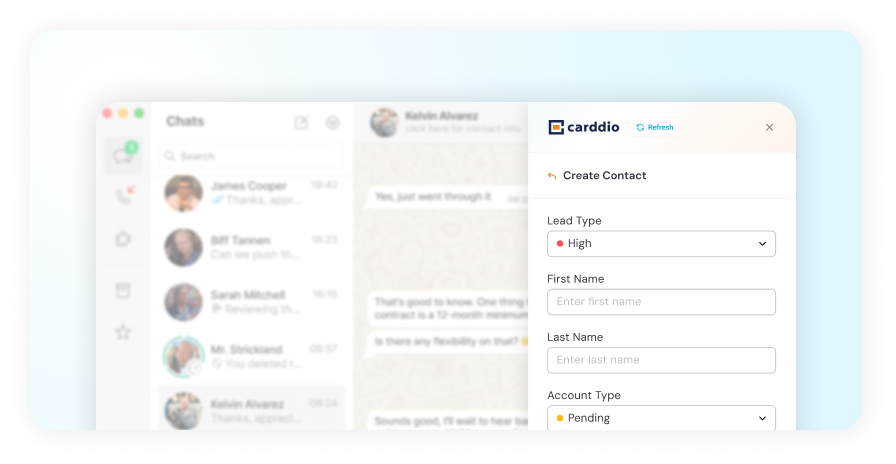
The CARDDIO Chrome extension puts your CRM inside WhatsApp Web. Save a chat as a contact, log meeting notes, schedule follow-ups, and assign tasks — all synced to CARDDIO CRM the moment you create them.
Everything You Need to Work a Lead, Inside the Chat
Save Contacts Straight From a Chat
Turn any WhatsApp conversation into a CARDDIO CRM contact in one click — no retyping a name, a number, or a company.
Log Meeting Notes in the Chat
Capture what was said while it is still fresh, attached to the right contact record instead of a notebook.
Schedule Follow-Ups
Set the next touchpoint without switching tabs, so no conversation goes quiet by accident.
Assign Tasks to Your Team
Create a task against the contact and hand it to the right person — from inside the chat window.
Everything Syncs to CARDDIO CRM
Contacts, notes, follow-ups, and tasks appear in CARDDIO the moment you create them. No exports, no end-of-day catch-up.
Works Inside WhatsApp Web
A side panel that sits alongside the conversation. No second screen, no copy-paste, no switching context.
HOW IT WORKS
From Chat to CRM in One Click
01
Install the extension
Install CARDDIO on Chrome and log in with your CARDDIO CRM account.
02
Open WhatsApp Web
The CARDDIO panel appears alongside your chats, already linked to your CRM.
03
Save the contact
One click turns the conversation into a Carddio contact record.
04
Work the lead
Add notes, follow-ups, and tasks from the same panel — all synced instantly.
KEY VALUES
Why Teams Put Their CRM Where They Already Talk
No More Copy-Paste Between Tabs
The gap between a WhatsApp conversation and a CRM record is where deals quietly die. The extension removes the gap entirely — the record is created from the chat, in the chat, in a single action.
Context Captured While It Is Fresh
A quoted price, a promised callback, the name of the person who actually signs — these live in the chat and nowhere else. Log them as meeting notes the moment they are said, against the contact they belong to.
Follow-Ups That Do Not Depend on Memory
Schedule the next touchpoint while you are still in the conversation. It lands in CARDDIO as a real follow-up with a date, not a mental note you will lose by Friday.
Team Visibility on WhatsApp Conversations
WhatsApp is usually a black box — one person's phone, one person's knowledge. Once a contact is synced, the rest of your team can see the record, the notes, and what happens next.
One Contact Record, Every Channel
A lead scanned from a business card, captured at an event, or saved from WhatsApp all land in the same CARDDIO contact record — so history is never split across tools.
Built on the CARDDIO Platform You Already Use
The extension is not a separate product with its own database. It writes into the same CRM your sales team works in every day, using the same contacts, pipelines, and permissions.
FAQ
Questions about Chrome Extension
Chrome Extension
Which browsers does the extension work with?
The extension is built for Google Chrome and works on Chromium-based browsers that support Chrome extensions, such as Microsoft Edge and Brave.
Does it work with the WhatsApp desktop app, or only WhatsApp Web?
The extension runs inside WhatsApp Web in your browser. The standalone WhatsApp desktop application is not a browser, so the panel does not appear there.
Do I need a CARDDIO CRM account to use it?
Yes. The extension writes into your existing CARDDIO CRM, so you sign in with your Carddio account and the data syncs to your organisation’s workspace.
What exactly gets synced to CARDDIO CRM?
The contact you save from the chat, plus any meeting notes, follow-ups, and tasks you create against that contact from the panel.
Can my whole team use the extension?
Yes. Each team member installs it and signs in with their own CARDDIO account, so records and assignments respect the same roles and permissions as the CRM.
Your Team Already Lives in WhatsApp.Put Your CRM There Too.
Stop losing deals in the gap between a chat and a contact record. Install the extension, sign in, and start capturing leads where the conversation happens.